Teaching my house to understand me: nine months of voice logs
I logged every voice command my Home Assistant heard since March, sorted local wins from AI fallbacks, and cut the AI share from about 17% to under 10%. Here's what moved the number and what didn't.


A disclaimer up front, because this post is an experiment. I wrote it with Claude. It interviewed me one section at a time, drafted from my answers and nine months of project logs, and then I reviewed and edited every word. The alternative wasn't a post I wrote entirely myself. It was a post that would never get published. I'd genuinely like to know whether this worked for you, or whether it reads like a robot wrote it. Let me know via email or the comments.
The problem with Escaping Jeff is that Alexa is pretty good and my home grown alternative needs some tweaking. Sometimes it doesn’t understand me and sometimes it doesn’t do what I’ve asked. In this project, I’m logging all the voice commands that Home Assistant Voice Preview Edition receives and classifying whether they were handled locally (good) or sent to AI (expensive and possiblgy creepy). With these logs I can see what improvements my Home Assistant voice intent scripts, custom sentences, and automations need. This varies from adding simple device name aliases (I say Den but it hears Dan) to sentence tweaks changing subject verb ordering.
This troubleshooting was relatively advanced for me because it’s doing websocket polling in a long running docker container. Home Assistant keeps only the last 10 voice requests in the debug UI so I’m persisting these to a file on my server to get a good long command history.
Turns out I got about 9 months and 2,000 voice requests to dig through.
This is the third post in my series on replacing Alexa with local voice control. If you're new here, start with Escaping Jeff with Home Assistant Local Voice for why I left Alexa, and What's the Weather? Local Home Assistant Voice for how I replaced the question we ask most.
The short version
This is a long one, so here's where nine months of logging ended up before I explain how I got there. The number I care about is the share of voice requests that fell through to Claude instead of being handled locally, so lower is better:
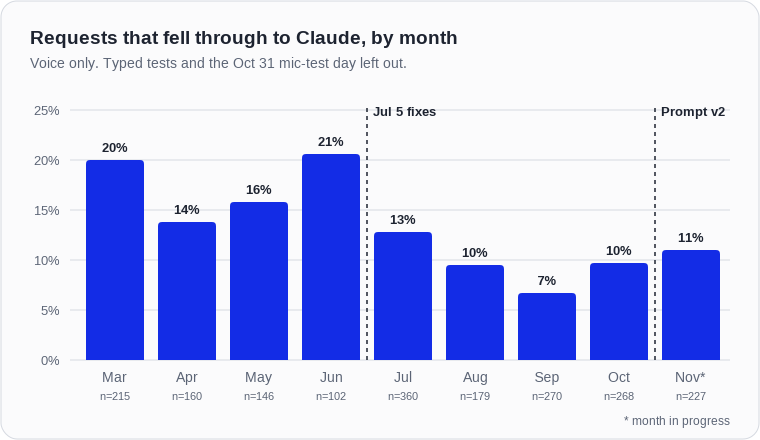
- Start: from March through June, 17.4% of voice requests fell through to Claude (691 requests).
- After one afternoon of fixes on July 5: 9.5% from July through October (1,009 requests). September hit 6.7%.
- Now: 7.1% since the November 17 round of fixes. That's only 56 requests, so I'll follow up once a few monthly reports are in.
The lesson: measuring and logging makes a difference you can feel, and it shows progress even when a problem is really hard. Every fix here came from a real request that failed in my house. Over time the log sorted the misses into a few kinds of problem, so I could go after the biggest wins first. And somewhere along the way the goal changed. I set out to get voice handled locally. I learned I first had to get it working.
Why the AI fallback hides the problem
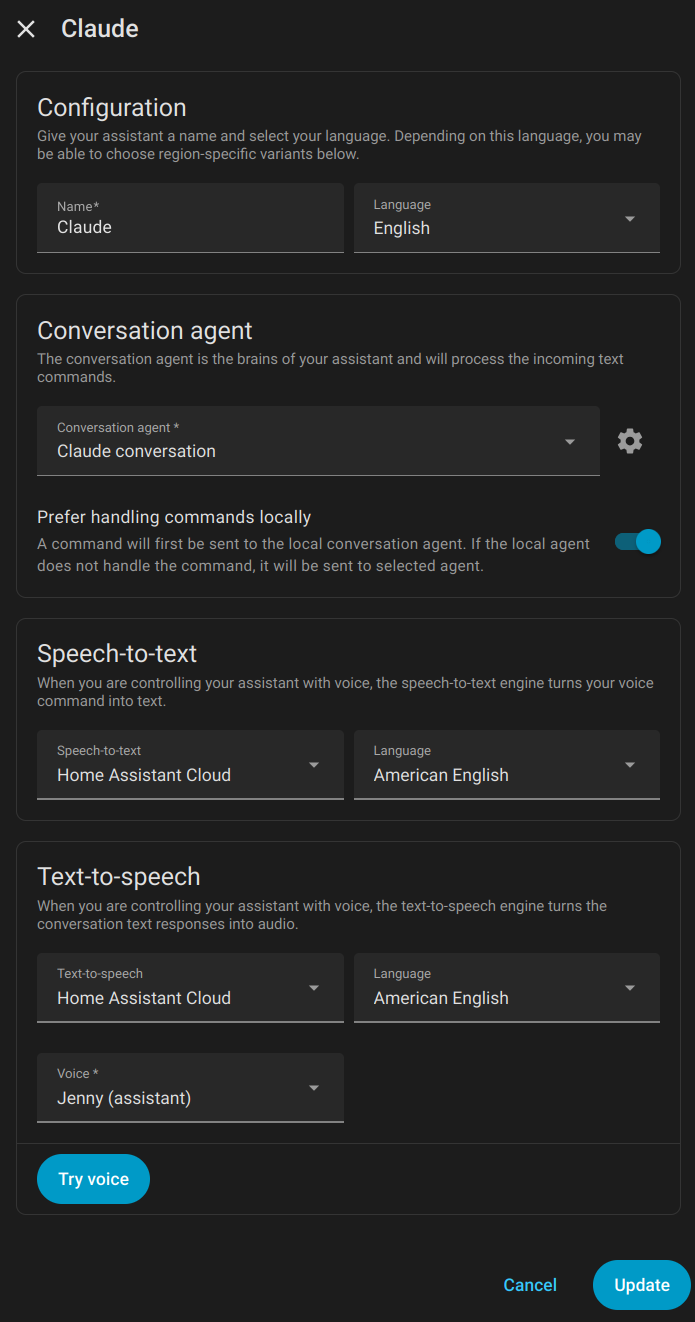
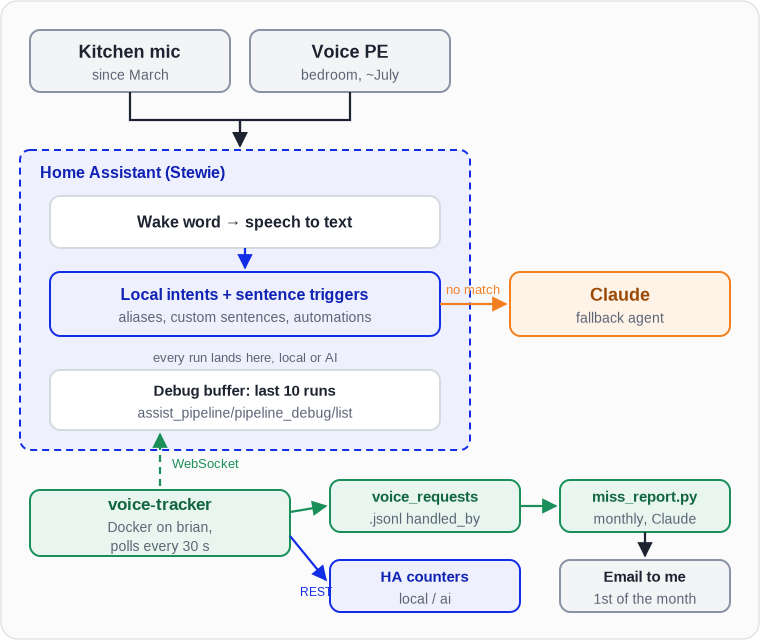
Quick recap of the setup from part 1: a microphone hears the wake word, Home Assistant turns my speech into text, and then it tries to match that text against its own local intents and my custom sentences. If nothing matches, the request falls through to Claude, which I have set up as the conversation agent. That's the "Prefer handling commands locally" toggle doing its job.
On paper that's the best of both worlds. In practice, a miss to Claude was a terrible experience.
Claude was WAY too chatty. I'd say something slightly off, and instead of turning on the light it would go on for many seconds explaining all the things it could do and all the ways it could help, then finish with a follow-up question offering me one of several options. At no point was it clear whether I could interrupt it, or whether I should give up and start the whole request over from scratch. I'm standing in the kitchen, I want the lights on, and my house is reading me a menu.
It wasn't the money. I loaded the Anthropic account with $5 back in March or April, and I only added more in November. Pennies. (OK, it bugged me a little to pay for an AI answer when a perfectly capable local responder was sitting right there.)
It's the principle. Home automation should be local. I should be able to turn on my lights without the internet, and without handing my credit card to Jeff Bezos or any other tech oligarch. That's the whole reason I left Alexa. Every request that falls through to a cloud AI is a small step back toward the thing I was escaping.
And here's the trap: Claude is good. Most of the time it figures out what I meant and the light does come on, eventually. So the misses don't look like failures. Nothing breaks and nothing logs an error. The request just takes the slow, chatty, cloud road instead of the fast local one, and unless you're counting, you never notice. So I started counting.
How the tracker works
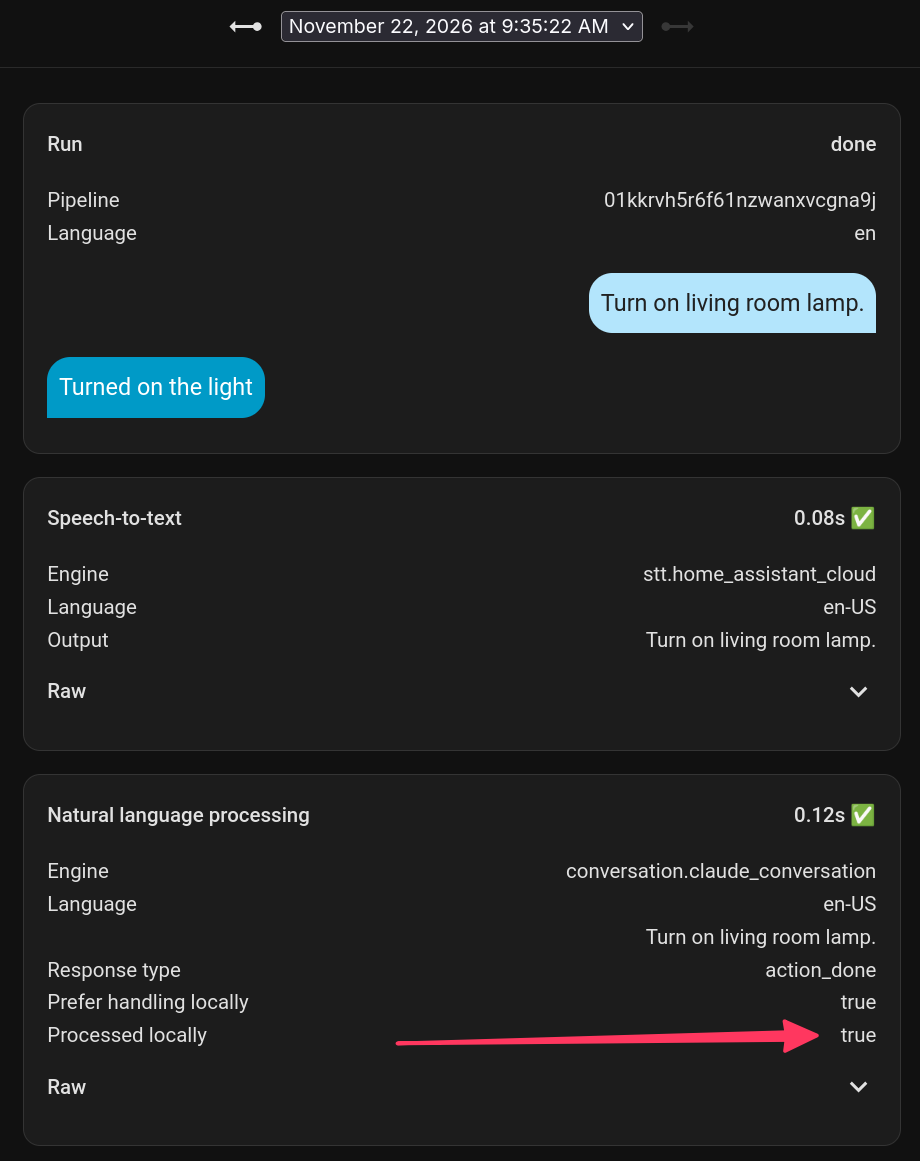
Home Assistant already knows whether each request was handled locally. Open Settings → Voice assistants → Debug and every run shows its steps, including a processed_locally flag on the intent step. The catch is that HA only keeps the last 10 runs. That's a hard-coded STORED_PIPELINE_RUNS = 10 in the assist_pipeline source. Ten requests is about one evening in my house, so if I wanted a month of history, I had to grab each run before it scrolled off.
There's no event for "a voice request just finished." Pipeline events don't fire on HA's event bus (core#124972), so there's nothing to subscribe to. The tracker opens a WebSocket to Home Assistant and polls the same debug list the UI uses, every 30 seconds. For each run it hasn't seen before, it pulls the full event list, reads processed_locally, appends a line to a JSONL file, and bumps one of two counter helpers: voice_requests_local or voice_requests_ai.
Why 30 seconds? It started at 5. Before relaxing it, I had Claude dig through the HA source to find the buffer size. With 10 slots, a 30-second poll only loses data if someone makes more than one request every 3 seconds for a sustained stretch. Not a problem in my house.
I want to be upfront about something. I would not have been able to write this on my own. I know what websockets and event streams are. I've seen them used to stream data out of an enterprise product at work. But writing a long-running async service that authenticates to Home Assistant, polls an internal API and survives reconnects felt way beyond me. I built it with Claude Code from the very first commit, and it was very cool to see it working right away. No team of developers needed. Just a Marketing Engineer and a dream.
Polling isn't a hack here. It's simply the only way into these internals today. It's also the part most likely to break: the debug list is there for HA's own UI, it isn't a documented public API, and a future release could change it. If you build something like this, expect to fix it after an upgrade someday.
The whole thing runs as one small Docker container on my home server. The code is on GitHub: bbbburns/voice-tracker.
The core of it, trimmed from tracker.py:
for event in events:
    data = event.get("data") or {}
    if event["type"] == "intent-start":
        intent_input = data.get("intent_input")      # what STT heard
        conversation_id = data.get("conversation_id")
    elif event["type"] == "intent-end":
        processed_locally = data.get("processed_locally")
        output = data.get("intent_output") or {}
        continue_conversation = output.get("continue_conversation")
        break
A log line:
{"timestamp": "2026-11-22T14:35:25+00:00", "intent_input": "Turn on living room lamp.",
 "handled_by": "local", "source": "voice",
 "satellite_id": "assist_satellite.kitchen_microphone_assist_satellite",
 "response": "Turned on the light", "continue_conversation": false}
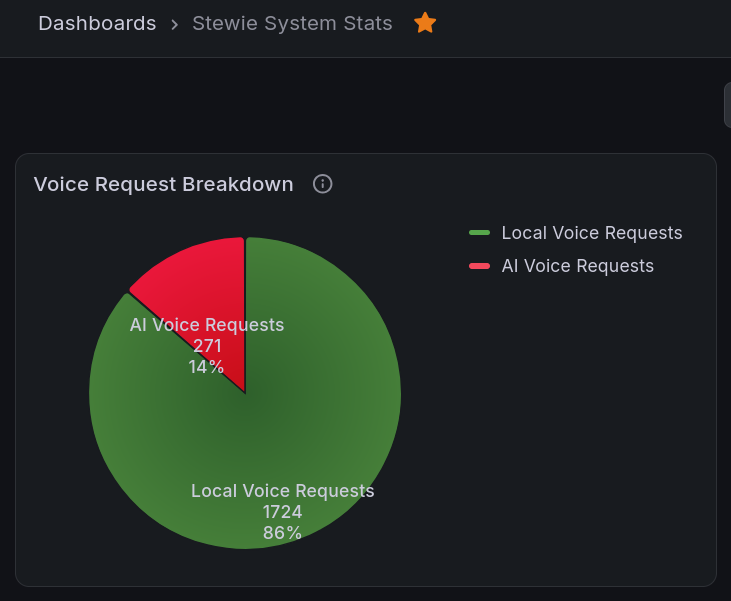
About those counters. I built a Grafana dashboard for them, local versus AI over time. Honestly? I barely look at it. The counters were fun to build and they make a nice screenshot, but they never told me what to fix. The breakthrough came from the raw log: every request, word for word, annotated with what happened. More on that below.
The timeline
| When | What I did | What I learned | AI share after |
|---|---|---|---|
| Mar 15–18 | Built the tracker, the 30 s poll, the live tail script, Grafana | The debug buffer is only 10 runs | baseline |
| Apr 23 | Fixed the restart bug (Claude spotted it) | My own bugs skew the counts | — |
| Mar–Jun | Just watched | 17.4% fall through | 17.4% |
| Jul 5 | Bucketing script plus about a dozen fixes | Most misses are cheap to fix | 9.5% (Jul–Oct) |
| Oct 31 | Deep review, sticky AI, prompt v2, tracker fix | Claude's own wording sends commands to Claude | 12.3% (Nov 1–17), new kinds of miss |
| Nov 16–17 | Monthly Claude-written miss report, new aliases, {chatter} |
A robot reviewing the robot works | 7.1% (56 req, early) |
March: it just worked
I set up the Claude integration in Home Assistant and built the tracker on the same day, March 15. I honestly wasn't sure the WebSocket connection would work, or that I'd see anything at all. I figured it would be super fiddly. It worked on the first shot. Within minutes, real requests were landing in the log file. At first it only logged the ones that went to AI. By the next day it logged everything, local and AI, so I could see the whole picture.
A few days later I added a little script to stream the log in real time, in a readable format:
./tail-voice-requests.sh
A real morning from early November, timestamps in local time:
2026-11-03 05:32:14  local  Turn off white noise.
2026-11-03 05:32:54  local  Turn on kitchen lights.
2026-11-03 06:22:31  ai     Good morning. Because it's different than studying for six hours. Mm-hmm.
2026-11-03 06:22:42  local  Turn on closet light.
2026-11-03 06:22:49  local  Good morning.
2026-11-03 06:49:26  ai     Set volume to 10 on bathroom.
2026-11-03 06:50:15  local  What's the weather?
2026-11-03 06:56:26  local  Play something.
2026-11-03 07:00:50  ai     Turn on dining light. A big blow from the snow. It's raining as cold in the world.
2026-11-03 07:03:27  local  Turn off sconce.
You can see the whole story of this post in ten lines. "Good morning" with a bit of conversation tacked on goes to AI, and 18 seconds later a clean "Good morning." goes local. The volume request in the wrong word order goes to AI. Someone asks for the dining light while the radio, or a person, keeps talking.
Leaving that running in a terminal was more entertaining than it had any right to be. We had a cat sitter come through, and you could watch them trigger the microphone in the middle of a normal conversation, with no idea anything was listening. I'm not going to print what they said. But it's the best argument I have for processing voice locally first. Every one of those false wakes went off to a cloud AI, and the person talking never knew.
Then I did what I always do: I put it on Grafana. I like to have everything in the homelab measured on one page, so I spent a day or so wiring up the counters and getting the charts right. Measure twice, cut once.
April: trust, but verify the counter
In April I restarted the tracker, and Claude noticed the numbers didn't add up: requests I'd made weren't in the log. On startup, the tracker assumed that if HA's 10-run buffer was full, it had already seen everything in it. It never checked those run IDs against what it had actually logged, so anything that arrived while the tracker was down was silently skipped.
The fix was simple: on startup, read the log file and seed the list of seen runs from there, not from whatever HA happens to have buffered. The lesson stuck with me, though. Before you trust a number, check the thing that's counting it. It comes up again in October.
Spring: the baseline
I didn't start fixing things right away. Through spring I mostly let the log fill up. By early July it held 691 voice requests, and 17.4% of them had fallen through to Claude. Month by month that was 20%, 14%, 16% and 21%. June jumped to 21% on the fewest requests of any month, just 102, and I honestly don't know why. On a month that small, a handful of misses moves the percentage a lot, which is why the rest of this post compares periods between fixes rather than single months.
What finally got me digging was having enough data to see a real pattern: not a handful of odd misses, but a steady mix of local responses and escapes, some of them the same request failing over and over. That's when it stopped being a curiosity and became a to-do list.
July 5: the fix day
I started the way I always start: by building a tool. I wrote a shell script, analyze-voice-requests.sh, that sorted every AI miss into buckets: speech-to-text noise, mishears, missing entities, climate, fixable info questions, genuine general-knowledge questions, and "other". I even taught it to pick up where I'd left off, so a second run only showed misses from after my last round of fixes.
Then I noticed I was doing the thing I always do. I was building a reusable tool to solve what was really a one-time problem. All that bucketing and sorting was something Claude could do live, and better, from the raw log. So I stopped polishing the script, handed Claude the log file, and asked what was going wrong and how to fix it. Things moved a lot faster after that.
Most of the fixes were embarrassingly cheap:
- Aliases for mishears. Speech-to-text is consistent in how it's wrong. I say "Den" and it hears "Dan", every time. So the Den lights now also answer to "Dan". The sconce got "Scots" and "Scott's".
- Singular and plural. "Wall light" and "wall lights" are different names to Home Assistant, and so are "dining light" and "dining lights". Both now work.
- Word spacing. This one makes me angry. "Bedtime" and "bed time" are different sentences to Home Assistant. One word or two, it matters. Both are triggers now.
- Word order. "What's next on my agenda" next to "what's on my agenda next". "What's the weather forecast" next to "what's the weather".
- Climate. Two automations for "set heat to 70" and "set air conditioning to 74". To be honest, I mostly run the HVAC on a schedule or from the app, but I tested both phrases and they work.
- Goodbye. A new automation: "goodbye" or "bye" turns off every light except the kitchen and stops the music. I worried a casual "bye" on a phone call would trigger it. It never has.
- "Stop the music." The built-in pause intent needs an area or a device name and the specific word "Pause", and those slots are required, not optional. So the most natural phrase of all, a bare "stop the music", never matched anything. A small custom sentence fixed it:
# custom_sentences/en/media_stop.yaml
language: "en"
intents:
  HassMediaPause:
    data:
      - sentences:
          - "(stop|pause) [the] music [(in|on)] [the] {area}"
      - sentences:
          - "(stop|pause) [the] music"   # the no-slot fallback
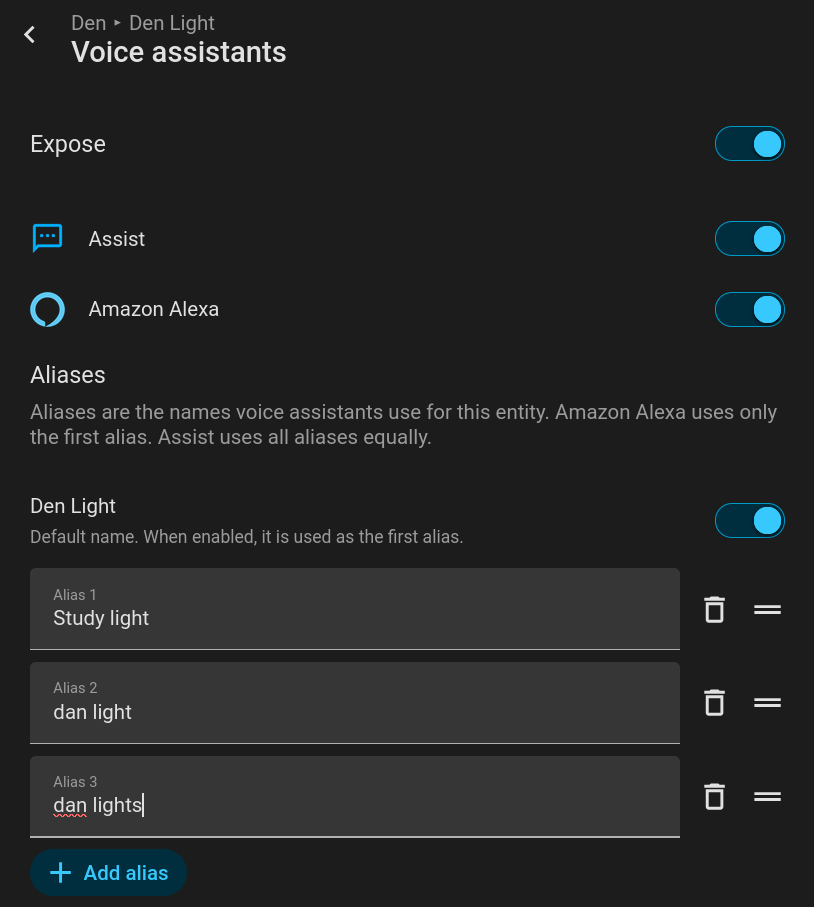
One more thing about the sconce. Having a "sconce" at all, and then trouble getting your voice assistant to understand it, sounds like a problem for stuck-up rich people. "I'm having such a terrible time with my sconce." (Read that in a haughty accent.) It still reliably comes out as all sorts of other words: "spots", "stops", "skunks", "scones". I keep adding aliases.
Did it work? Yes, and you could feel it. July came in at 12.8%, August at 9.5%, and September at 6.7%, the best month so far. Across July through October, 9.5% of 1,009 requests fell through, down from 17.4%. The numbers are nice, but the real difference was the den lights, the sconce and "stop the music" just working. There's a lot less profanity in the transcripts now.
October: a bump that wasn't real
At first glance October looked like a step backward: 12.8%. But 12 of those AI misses came from a single day, October 31, when I stood in the kitchen deliberately trying to break things (more on that in a minute). Leave that day out and October is 9.7%, right in line with August. If you're going to test your voice assistant, tag your tests. Since then every log line carries a source field, "voice" or "text", so typed experiments stay out of the stats.
Digging through October also turned up about 520 runs since July that never reached the intent step at all. Most were duplicate wakes. I added the bedroom Voice PE around July, and when it and the kitchen mic both hear the same wake word, Home Assistant cancels one of them. Claude was SO concerned about this. In real life it's inconsequential. Sometimes I hear the wake chime on both, one of them does what I asked, and that's it.
Some of those 520 were not harmless, though. They were real requests the tracker had polled while they were still in progress, before Home Assistant had finished them. The tracker marked them as seen and never came back. Slow requests like "Good morning." were the most likely to vanish while she opens the blinds and reads the weather, and Claude's replies are slow too. That's the second time my own counter was lying to me. The fix is one line: don't count a run until it has finished.
def run_is_finished(events):
    # HA's debug list includes runs still in progress; retry those next poll.
    return any(event.get("type") == "run-end" for event in events)
Where the misses were coming from
By the end of October I had Claude sort every AI miss since the July fixes into types:
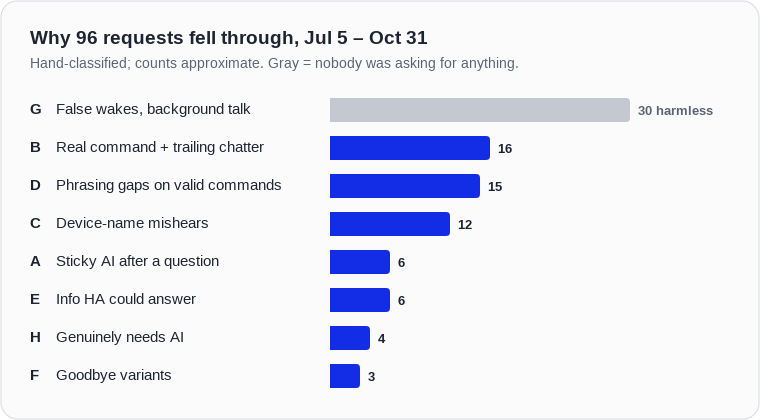
Don't let the biggest bar fool you. False wakes and background talk are the mic catching a TV show, the cat sitter, or "Never mind.", "Yeah." and "You can just." Claude answers, nobody was asking, and nothing in the house was supposed to happen. It costs a fraction of a cent and nobody notices. I could tune the wake word sensitivity someday, but it isn't a priority.
The bars below it are the real to-do list, and every one is a command somebody actually wanted:
- Trailing chatter: "It's bedtime. Good girl.", "Feed the cats. Oh, we already did that.", "Set kitchen volume to 15. OK."
- Phrasing gaps: "Let's watch TV" four times, "Turn off dining.", "Set temperature to 74", and three laundry requests in two minutes from someone who clearly expected a laundry command to exist.
- Mishears: "Dying Light" for dining light, "Watch out v" for watch TV, "It's spare time" for bedtime, and the sconce, always the sconce.
- Genuinely needs AI: the capital of Vermont, how many licks to the center of a Tootsie Pop, and "Call Dad", which no amount of local config will fix.
Seeing the misses sorted like this is what made each round of fixes faster. Start at the biggest bar that's actually a problem, fix it, and check whether it shrinks next month.
October 31: the question mark
This is the one that made me stop worrying and learn to love handing Claude my raw logs.
It started with the alarm. One morning I couldn't stop it. Kat and I are lying in bed, the alarm is going off, and I'm saying "stop the alarm", a command I know has worked a hundred times, and the house is clearly ignoring me. I felt like a failed husband and a failed tech enthusiast at the same time. I gave up, stopped it from the app, and then, still in bed, opened Termius on my phone, attached to tmux on the server, started a Claude Code session, and typed more or less: "WTF, why is this happening?"
Claude found the common thread in the log. A garbled false wake ("Is it?", "Cool, I'm.") goes to Claude, as it should. Claude, trying to be helpful, answers with a question: "…What can I do for you?" The next command, a perfectly normal one, then also goes to Claude, even when it's a phrase that always works locally. So any mishear that goes to AI can potentially derail valid local commands asked next.
The numbers made it impossible to ignore. Known-good phrases went to AI 0.8% of the time when there was no recent request (9 of 1,087), and 3.2% right after a local request. Right after an AI reply, within 30 seconds, they went to AI 17.8% of the time (8 of 45). Something about following an AI reply made Home Assistant skip its own local handling.
Claude then traced it through the Home Assistant source (2026.10.4). A reply ending in "?" sets a continue_conversation flag. The satellite reopens its mic to hear your answer, and that next run is marked _intent_agent_only. It goes straight to the AI agent and skips both the local intents and every sentence-trigger automation. My alarm-stop, bedtime and watch-TV commands are all sentence-trigger automations, so they were the ones that broke. It only affects that one reopened-mic window. A fresh wake word afterwards is handled normally, which is why it felt so random.
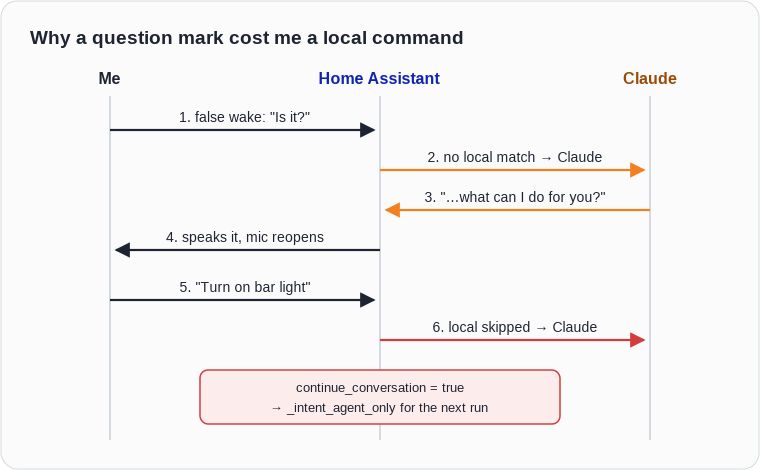
Then came the test day, me in the kitchen saying "Can you help me with something?" and "cool, wow" to a speaker over and over. Kat was home studying, so she got to listen to me be crazy at the thing. Halfway through I realized I could just type. The Home Assistant companion app on my phone has Assist built in: cancel the mic, switch to the keyboard, and the typed request goes through the exact same pipeline. "i need advice" got a question back, and the next "turn on bar light" went to AI. Reproduced in seconds, no shouting required.
The fix lives in Claude's instructions, not in Home Assistant. My first attempt was one blunt line: "Never respond with a question." It held for 6 of 7 tempting phrases, and then "Can you help me with something?" still got "…What do you need?" back.
The second version worked. It names the exact phrases to avoid, gives fixed replies for garbled input and small talk, and, the part I found interesting, explains why. Claude told me models do better with an instruction plus an example and a reason. That's funny, because it's how you train people too: give someone the reason and they understand why to follow the rule. That might be anthropomorphizing a bit much, and I don't really know why it works better. I'm just glad it does. It passed every typed re-test:
- End every reply with a period. Never ask the user anything, including offers
  like "What can I do for you?" or "What do you need?". A reply ending in a
  question mark keeps the speaker listening and sends the next command to you
  instead of the faster local handler.
- If a request is garbled, cut off, or sounds like overheard conversation,
  reply only: "Sorry, I didn't catch that."
- For greetings, thanks, small talk, or a request for help with no specific
  task, reply only: "Ready when you need me."
Since prompt v2 went in, the number of voice replies that left the mic open for a follow-up is zero.
This turns out to be known upstream. Someone reported it (core#162768) and it was closed as intentional, and there's an open feature request (discussion #2924). If Home Assistant wants to build out follow-up conversations, good for them. I'm not jumping into a closed issue.
But I personally disagree with follow-ups, at least in my house. I want a single command to work, or fail. I tell it to do something, and it does or it doesn't. If it doesn't, I'll figure it out some other way. I have no good way to interact with a voice assistant in an active home that's going to STOP me and ASK me what to do next. I've never seen that path, especially with an AI fallback, lead anywhere except a long, useless, expensive conversation. Show me a follow-up that works with the music playing, the exhaust fan running, Kat talking to me and the cats all at once, and I'll reconsider. Good luck with that, voice assistant. I can't pause my entire life to meet the needs of a device that's supposed to make my life easier.
The bigger lesson: your fallback AI's wording can change how your local system routes the next request. One question mark was enough.
November: let Claude review Claude's misses
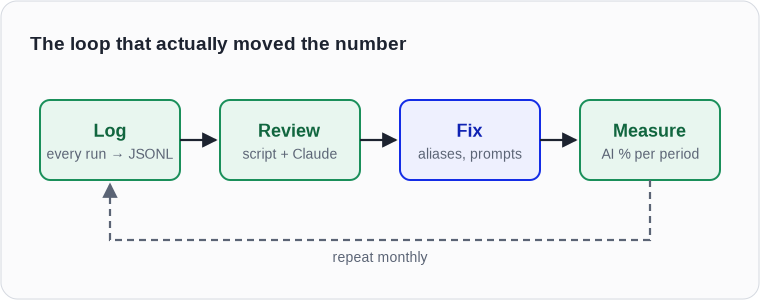
By November this project had trailed on for nine months. The baby needed to be born. I was already setting up an ops workflow on the server to remind me about recurring chores, so I gave this one a monthly email too: a nudge to make real fixes for real problems the house was having, instead of another round of measuring.
On the 1st of each month, miss_report.py takes the previous month's AI misses, pulls my exposed entities, aliases, areas and sentence triggers from Home Assistant, and asks Claude to group the misses and suggest fixes, with YAML I can paste. It changes nothing in Home Assistant by itself. I decide what goes in. A small file, report-decisions.md, lists the things I've already decided not to fix, so the report counts those misses instead of nagging me about them. Each report also reads last month's, so it opens with "here's what happened to last month's suggestions" and a six-month trend table.
The monthly report runs on Claude Sonnet, about 15 cents a run. That's deliberate. The report goes through the API, and API costs still call for some frugality. When I need to throw real power at a problem, I open a Claude Code session on my subscription, which is the cheaper way to dig. That's where the big finds came from. Especially once Opus 5.5 came out, the suggestions got noticeably better. It found the question mark, and it suggested a fix for trailing chatter I wouldn't have thought of.
Here's a trimmed piece of the first test report, covering October. Notice that it checks my existing aliases before suggesting new ones, and it caught the question-mark problem on its own:
1. "Letterbox." (1), "Turn on letterbox." (1), and probably "Turn off later." (1). Class C.
   Speech-to-text hears "litter box" as "letterbox", and the AI said "I don't have
   a letterbox device." light.den_closet already has the alias "litter box", so add
   the two spellings that were heard. "Turn off later" is likely the same mishear,
   but I wouldn't alias "later". Set in the UI on light.den_closet (Den Closet),
   adding aliases:
     letterbox
     letter box

3. "Turn on barley." (2). Class C.
   Speech-to-text hears "bar light" as "barley". The AI's reply confirmed it:
   "Turned on the Bar Light."

Odd, worth a look
- Voice replies ending in "?": 1, at 16:18 on Oct 31 ("...What do you need?").
  Typed replies at 16:35 and 16:36 also ended in "?", but from 17:51 none do. The
  prompt fix probably landed between those times, so this one likely predates it.
  It should be 0 next month.
The first test reports turned up a new batch of mishears: "Letterbox" for the Den Closet (where the litter box lives), "barley" for the Bar Light, "voice machine" for White Noise, and "Let's watch TV" failing because speech-to-text sometimes writes a curly apostrophe (’) instead of a straight one ('), and Home Assistant treats those as different sentences. And of course the sconce. My favorite part of the whole project might be the list of words it hears instead of "sconce": spots, stops, skunks, scones, scoffs, Scots.
The trailing-chatter fix is a wildcard. People finish a command and keep talking ("It's bedtime. Good girl." [that one was to the cat, I promise]), and the extra words break the exact match. A {chatter} slot at the end of the automation trigger soaks them up. Keep the bare phrase as well, because the wildcard needs at least one word after it to match:
triggers:
  - trigger: conversation
    command:
      - it's bedtime
      - it's bedtime {chatter}
      - stop [the] alarm
      - stop [the] alarm {chatter}
Did it work? The question-mark fix did. Not one follow-up since. November 1–17 still came in at 12.3%, but look at what missed: trailing chatter, mishears, false wakes ("Yeah.", "Please.", "Next."), and one new kind, compound commands. None of it was the question mark. That's progress, even if the percentage doesn't show it. The problem I fixed stayed fixed, and the log moved on to the next class of problems. (The tracker also now counts slow requests it used to drop, so the measurement got more honest at the same time.) Since the November 17 fixes it's 7.1%, but that's only 56 requests. Ask me again in a few months.
The compound command is my favorite story from November. Kat asked for two things in one breath: "Turn off white noise and open bedroom blind." My first thought was "Oh, great, here we go. It's about to fall on its ass over some normal request it can't handle." Home Assistant's local intents couldn't handle it, so it fell through to Claude. Claude handled it just fine, and the latency wasn't even that bad.
That changed how I think about this whole project. My real goal was never "local versus AI." It's getting from a voice command to a working automation. Sending the misses to AI was supposed to be what got me there. Along the way I realized I didn't even have working voice control yet, even with AI, and the project grew. If I can hammer out all the "it doesn't even work" problems and get to "it works, but it should be local", I'll be in a much happier place. I think that's the direction we're headed.
What I learned
Measuring makes a difference you can feel. Without the log I'd have said voice "mostly works" and gone on swearing at it. With the log, every fix came from a real request that failed in my house, and I could see the result the next month. Even on the hard problems, like the question mark, the numbers told me I was getting somewhere before it felt like it.
Don't build a tool for a one-time problem. I spent time on a Grafana dashboard and a bucketing script, and the thing that actually worked was handing Claude the raw log and asking what was wrong. Save the tooling for the parts that repeat, like the monthly report.
Check the thing doing the counting. Two tracker bugs (the restart seeding and the dropped in-progress runs) and one untagged test day all bent my numbers. If a number surprises you, suspect the counter first.
Home Assistant sentences are painfully literal. "Bedtime" isn't "bed time". A curly apostrophe isn't a straight one. "Dining light" isn't "dining lights". A required slot isn't optional. Speech-to-text, on the other hand, is consistently wrong in the same ways, so a mishear is just an alias waiting to be added.
People route around a phrase that's a pain to say. In July my journal says "Have to remember 'set area volume to x'". I never taught the family, or even myself. Part of the reason is that areas collide: "set kitchen volume to 5" sets the Sonos and the kitchen mic's own speaker, because both live in the Kitchen area, so I have to say "set kitchen sonos volume to 13", in exactly that order. So I just went back to the Sonos app and the button on the speaker. The volume misses went quiet because we stopped asking, not because it got fixed. A falling miss rate can hide a feature nobody uses any more.
Your AI fallback's wording affects routing. One question mark at the end of Claude's reply was enough to send my next command around every local handler I'd built. Watch what the AI says, not just whether it gets the right answer.
"Working" comes before "local". I set out to drive AI escapes down. Along the way I learned I didn't have reliable voice control at all, AI or not, and that matters more.
What's next
- The first monthly report lands December 1. I'll write a follow-up once a few of them are in.
- Volume, the real unsolved one. Either move the kitchen mic into its own area or add a custom sentence so "kitchen volume" means only the Sonos. And someday "set all sonos to 10" for the whole house.
- Compound commands, done locally. Claude handles "turn off white noise and open bedroom blind" fine for now.
- Not yet: wake word sensitivity, and a local LLM in place of Claude. Both can wait until the "it doesn't even work" list is empty.
I'm still chasing the dream of completely local voice control. But I've learned to do it in order. First get every command to work, whoever handles it. Then find the biggest remaining problems and solve them. Then, eventually, think about a local model to catch whatever's left. Until then, the best voice command is the one that works, and every month I can drive the AI escapes down a little further. The log will tell me if I'm making progress.