Dinner Spinner Revamp
Making it easier for our family to find something to eat. Or, recreating Yelp in my free time.


I made our dinner spinner as a quick way to randomly select one of the restaurants in our list. It worked fine for the 15 common restaurants I added around Durham. Then I added restaurants to that list from all over the world for over three years. Now the random selection was unusable.
I had two main sorts of problem to solve.
- Update the restaurant metadata so it's accurate.
- Surface the restaurant metadata so the spinner can filter on it.
The first problem is knowing that this place only serves cocktails in Barcelona.
The second problem is saying from inside the app, "I'm in Durham and want breakfast."

Solving Metadata Challenges
I used headless Obsidian Sync to make sure all of my notes were synced down to my dev server. Then I pulled all of the restaurant notes into a scratch space folder.
At first, I set the sync to pull-only to minimize the risk of making destructive changes to my vault.
I then asked Claude to look through the restaurants and the 300 files of yaml frontmatter to come up with a set of reliable metadata we SHOULD use going forward.
Claude was helpful to examine the existing metadata, then pull from the internet anything I might have been missing. For example, I had it get a price range and the exact GPS coordinates. I went through several batches of review where Claude prompted me with an artifact and I could visually confirm the changes or propose my own edits. This took a while for that many restaurants, but having a confidence ranking on the suggestion turned this task into a single cup of coffee instead of the many months I had been putting off the manual review.
After I was happy with all the restaurant files, I flipped the headless sync into bidirectional mode and copied all these changed files back into the vault directory. The sync was fast and I saw the changes start populating on all my other devices with Obsidian as well. I flipped the sync on the server back to pull-only.
Now my phone, iPad, and laptop ALSO have these synced restaurants.
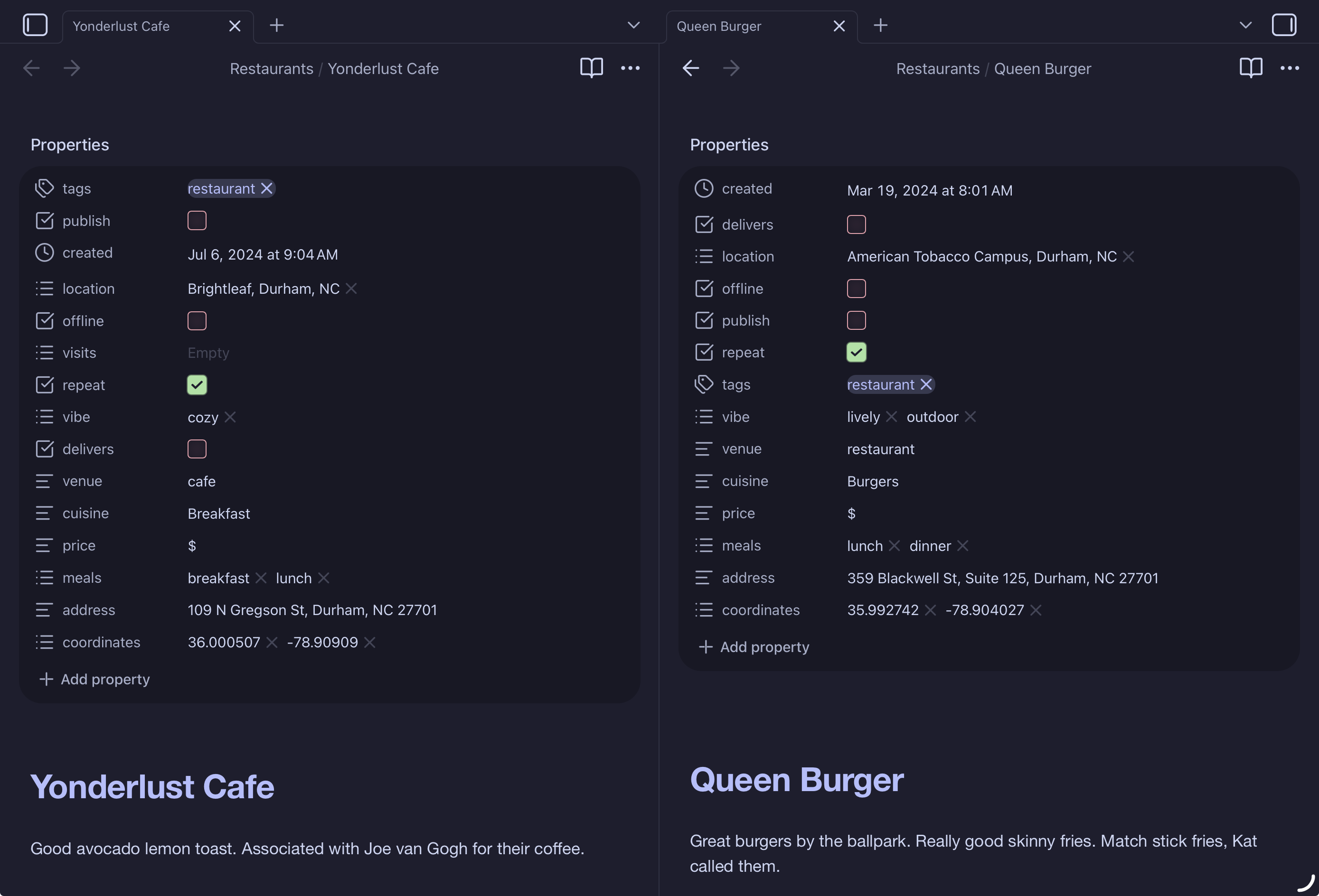
As I add restaurants, I can just repeat the above process to clean anything up. You can see in the screenshot I have note bodies that include my personal notes on the places. This note body never gets copied or published anywhere (except this screenshot).
Adding Filters
The next step was pretty simple. Once I had a normalized set of notes with good metadata, I asked Claude to walk through a few design options to filter based on these metadata tags.
Originally I had a complicated script to read all the restaurant notes, process the metadata, and load the metadata into a Cloudflare KV globally. This was definitely overkill for what I needed. I switched to a method where I locally convert all the note metadata into a single JSON file and push it as a small static asset to the site. Less complex, easier to update, fast.
Adding a Location and List
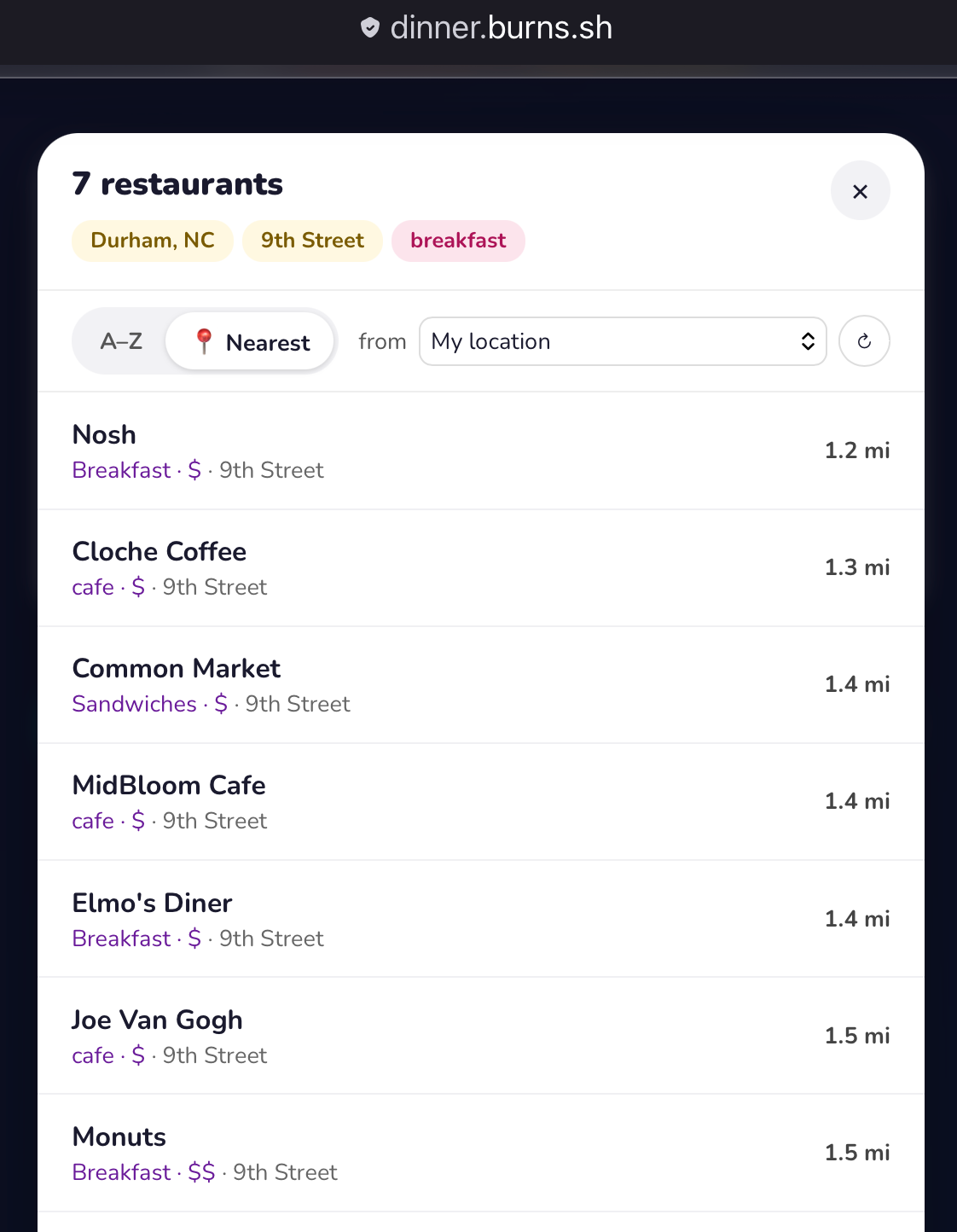
Because all the restaurants have location metadata now, and I'm planning to run this from my phone, I can do things like show only restaurants within a certain distance, or show a list of restaurants matching my filter sorted by distance.
Claude made very short work of this once it had the metadata in the files.
Next Steps
I'll keep using this to see if there is anything else we need to add. For our family, it helps us narrow our options when we can't decide on a place to eat.