Escaping Jeff with Home Assistant Local Voice
Weaning myself from the Amazon voice ecosystem with Home Assistant.


I've become pretty frustrated with the commercialization and general enshittification of the Amazon voice ecosystem. My whole house uses Amazon Echo devices for voice control. I'm working on changing this. Here's how.
Background
I have Home Assistant for home automation.
I have the Amazon Echo devices because they are excellent and cheap microphones that do a great job picking up my automation requests. I do not need any of their speaker capabilities, other than to hear their confirmation that they received my command.
The pipeline I have today is the following:
Me --> Amazon Echo --> Amazon Voice Processing Cloud
                                    |
                                    |
                       Home Assistant Nabu Casa Cloud
                                    |
                                    |
Local Smart Device <-- Local Home Assistant Rasp Pi
I've always been amazed that this works reliably, but somehow it does.
The Problem with Amazon
The final straw came with a recent change to the Echo Show. The one with a screen and a camera. I bought the Show years back because I thought it would be nice to have a device in the bedroom that showed photos and also acted as a smart speaker. It had a hard switch for the camera, so I was less concerned about it snooping on my visually.
I understand that the Amazon Echo devices are so cheap exactly because they are subsidized by:
- Data hoovering
- Advertisement pushing
I've been fine with these trade offs up until recently. I'm less concerned about the data hoovering because I use AdGuard Home for my home DNS, and have all outbound advertisement domains as blocked as I can get them. But I couldn't stomach the advertisement pushing. I was paying for a device to show me ads in my bedroom.
Fuck. No.
The Echo Show device has constantly broken my trust over time with the following:
- Every few months, they would add a new default skill or screen experience that would suggest content I did not want to see on the screen. I had to dive deep into the menus and turn this advertising off.
- After using skills or sending voice commands to it, it suggests routines or items I do not want.
- Most recently (in the last 3-6 months?), the device has transitioned to a mirror of my Amazon browsing history, suggesting that I really need to buy sticks of RAM with RGB, because I bought them once before, two years ago. It is STUCK on those sticks of RAM, and no longer showed me my family photos, unless I specifically ask to see my family photos.
- I would estimate 90% of the display is advertisements, or information I did not ask for and do not want. Only 10% if the time do I ever see a family photo.
- It degrades the quality of the photo with a "crinkled paper" filter, making them look like garbage. I guess they're probably saving a lot of bandwidth that way.
The Solution - Year(s) of Voice
I've put up with this for too long, and I've been slowly watching Home Assistant's year of the voice chug along since 2023. I think it's now entirely possible to get a local voice processing setup on some REASONABLE hardware thanks to the availability of the Wyoming protocol, Whisper, and Piper.
I'll get into all the details of this, but let's just look at what my new stack would be like:
Me --> HA Speaker --> Local Home Assistant Rasp Pi
				    		|
			    Local Docker Whisper + Local Docker Piper
			                |
			    Local Home Assistant Rasp Pi
			                |
     Local Smart Device  <--+
Look at what's missing in this setup. That's right, we've REMOVED the cloud. In theory, we've removed any requirement for each voice command to be processed in the cloud.
Instead, they'll be processed locally on a toaster-sized server I already have doing some other tasks.
Let's talk about HOW we do that.
The Implementation
Let's take each of these in turn.
- The Speaker and Microphone
- Local Docker Whisper and Piper
- Local Home Assistant on Raspberry Pi
- Assuming you have this already.
- Local Smart Device
Speaker and Microphone
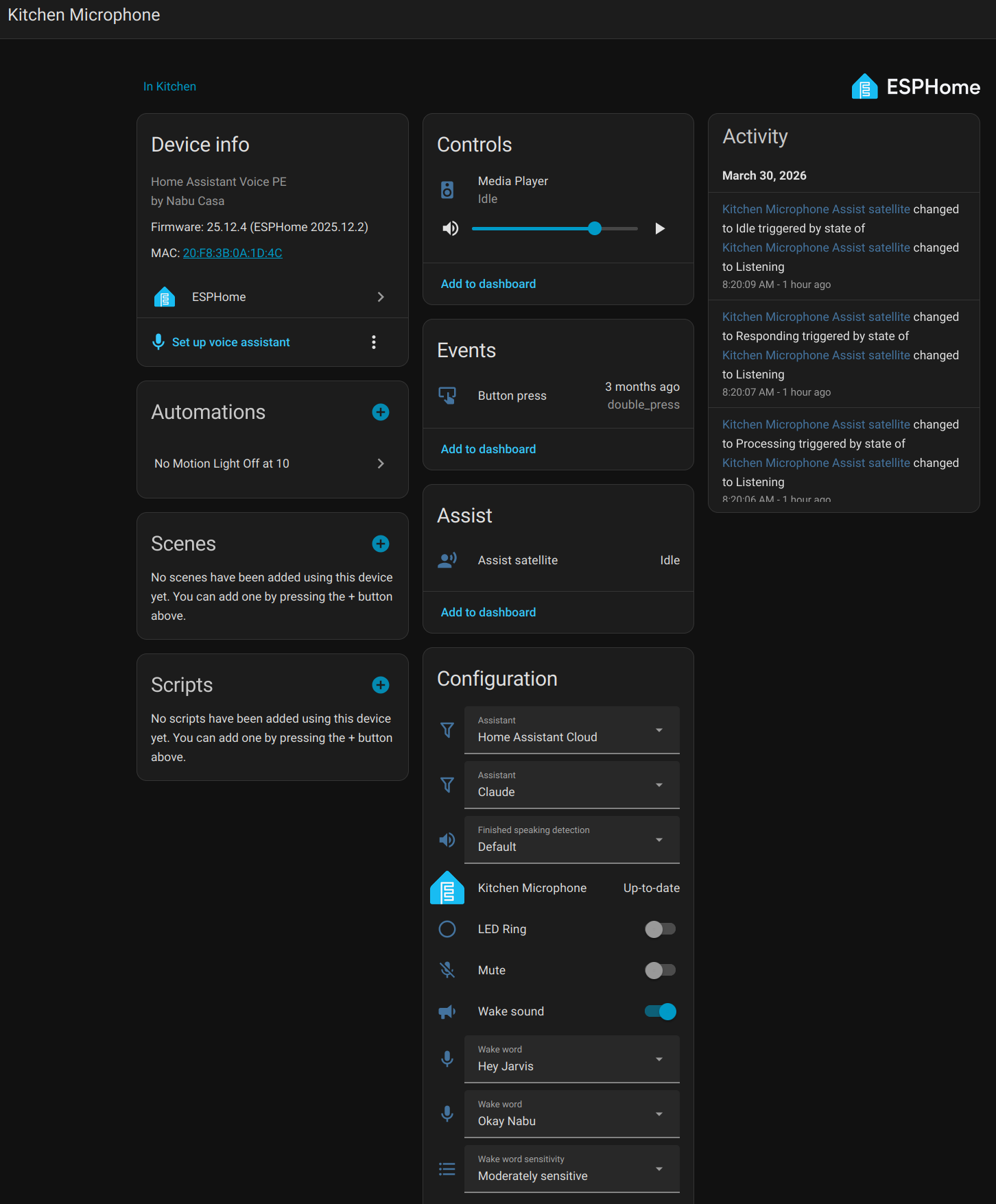
I'm using the Home Assistant Voice Preview Edition speaker. I picked this up from the ameriDroid site linked from the Home Assistant page for 60 bucks. Maybe this is too much money for an ESP32 board, but the packaging is nice, the setup was simple, and it supports the Open Home Foundation!
Local Docker Whisper and Piper
Need to setup both Whisper and Piper.
Whisper - Speech to Text. This gets your voice recording from the speaker and turns it into text.
Piper - Text to Speech. This gets any possible text response and turns it into sound the speaker can play to you.
Docker Compose to run Whisper and Piper on Brian could be cool to see how fast it is. Alternative to using Home Assistant Cloud.
This is what I have working in early 2026
~/docker/wyoming/compose.yml
services:
  whisper:
    container_name: whisper
    image: rhasspy/wyoming-whisper
    command: --model small.en --language en --data-dir '/data'
    volumes:
      - whisper-data:/data
    environment:
      - TZ=America/New_York
    restart: unless-stopped
    ports:
      - 10300:10300
  piper:
    container_name: piper
    image: rhasspy/wyoming-piper
    command: --voice en_US-lessac-medium --data-dir '/data'
    volumes:
      - piper-data:/data
    environment:
      - TZ=America/New_York
    restart: unless-stopped
    ports:
      - 10200:10200
volumes:
  whisper-data:
  piper-data:
Home Assistant Voice Pipeline Configuration
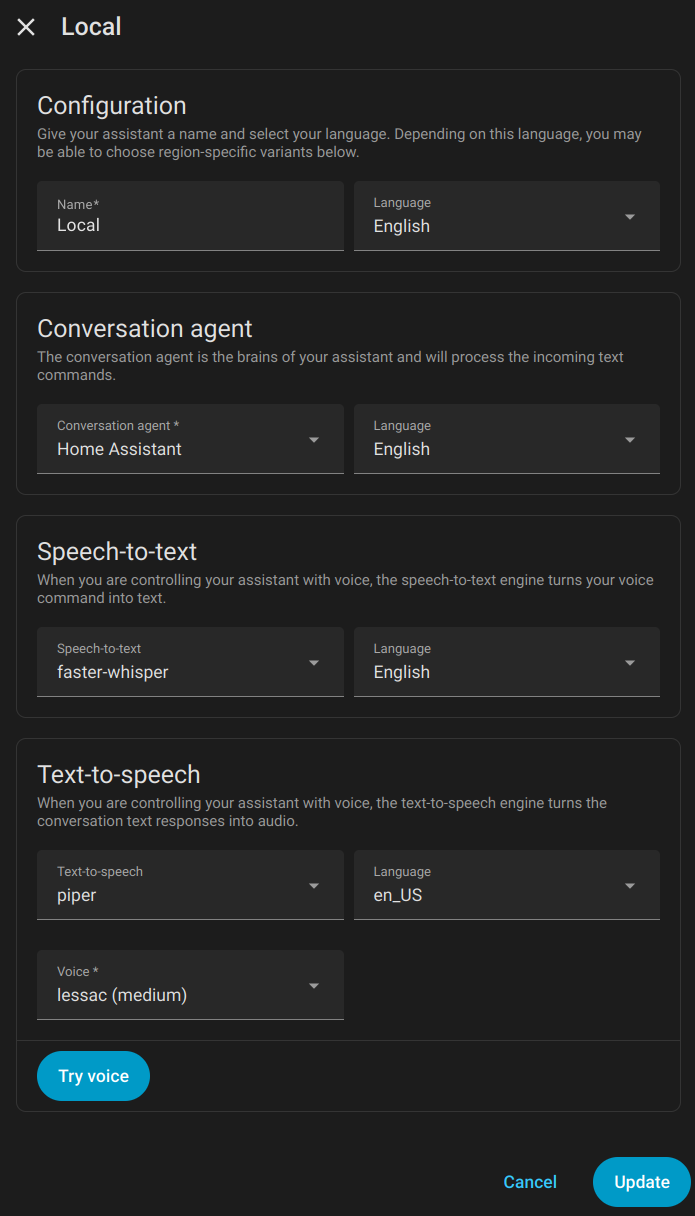
Here is the local pipeline I had been using that leverages the above Docker containers, faster-whisper and piper. You can set these up through the Wyoming integration using your Docker server IP and the port numbers in the compose file.
Local Smart Device
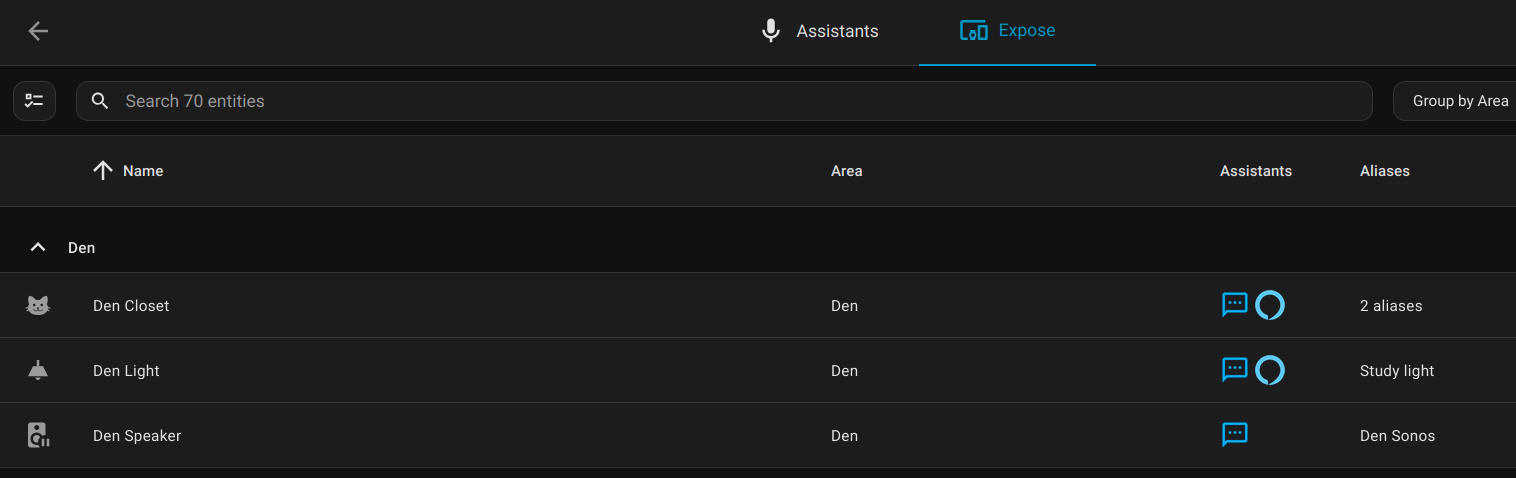
For voice control of a smart device in Home Assistant, add the device, expose it to "Assist," and setup any aliases that might come in handy when you refer to it by name.
The Experience
Using the local faster-whisper model on the server in my closet was a "just-ok" experience. It didn't always understand what I said with names like Den, Dining, and Island being misheard as various things like Dan and Ten, then Home Assistant telling me it didn't know any device or area named Dan.
I could tweak this by priming the faster-whisper model with a startup prompt. Apparently you can do something like this and give it sample prompts like "turn off den light, turn off dining light, turn off island light."
The OTHER problem was the speed. I have this running on a server cobbled together from a 16 core laptop chip and 64 GB of RAM. No GPU. It's fine, but without GPU acceleration it can take an extra second or two on the voice transcription. This isn't the end of the world, but when you couple the two problems together it means a slightly frustrating experience that you ALSO need to wait for.
The Workaround
OK - back to the goals. We want Bezos out of the bedroom. A second goal is to get this all working locally. I think if we look at the priority we can find a workaround.
The Open Home Foundation slash Nabu Casa run the Home Assistant Cloud. You can select this for your speech-to-text and text-to-speech in the Home Assistant Voice Pipeline. Even though it's in the cloud, it's not owned by Amazon AND it doesn't seem to suffer from these same latency and transcription problems. Mostly.
Here's what my new voice pipeline looks like now. Notice the "Prefer handling commands locally" selector.
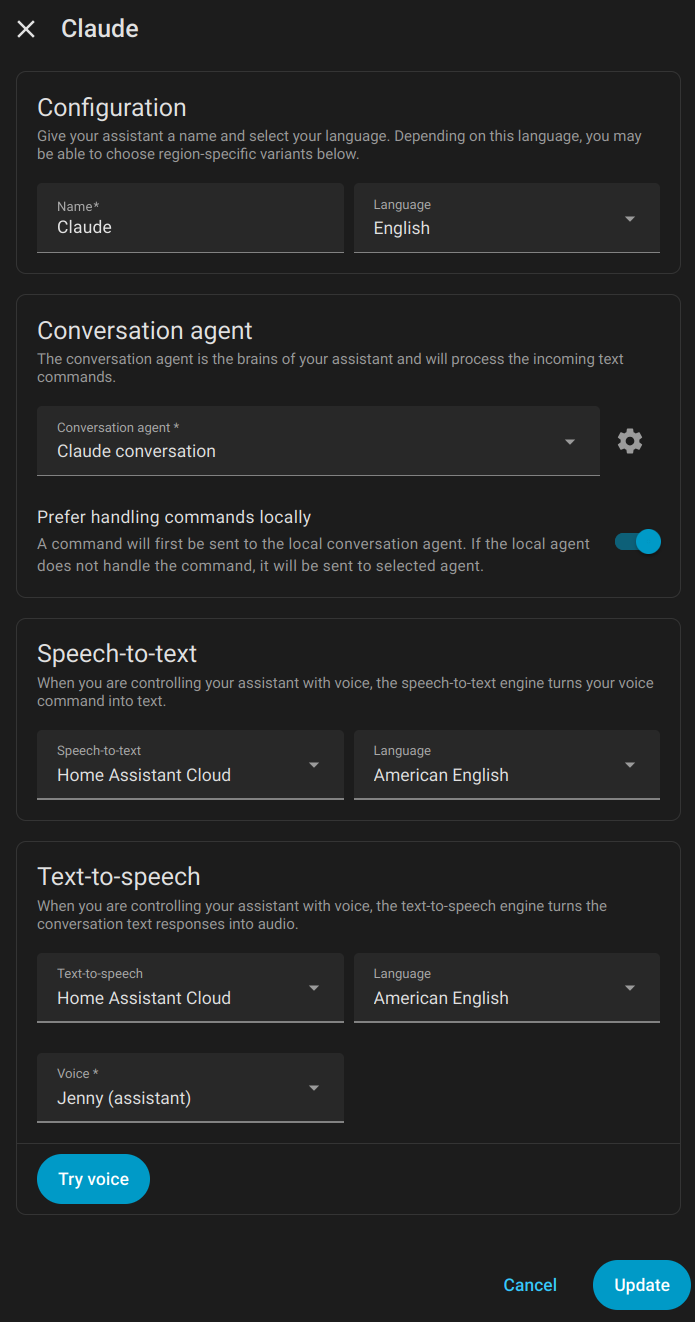
If the most important priority is the de-Jeffing, I think we found a solution.
After living with this for a few weeks, I found the Home Assistant built-in sentences limiting. I added my own sentences for the common "escapes," the things that Home Assistant transcribed, but just didn't know how to do.
More blogs on this later, but things like "What's the weather forecast?" and "What's next on my agenda?", or dumb stuff like mixing up the VERY rigid sentence order. Think "Set volume on kitchen to 15" vs "set kitchen volume to 15". You can add custom sentences to catch all of these, one at a time.
The Workaround to the Workaround
I grew tired of having to manually add all these extra sentences. What if there was some sort of system that you could just pass a vague request to, and then it would use a model to figure out what you meant, and propose an action back to the system.
Large Language Models are great for this!
So, I setup an API key at platform.claude.com, loaded 5 bucks into the page, because apparently it doesn't work with your existing subscription, and modified my voice pipeline.
Now the path looks something like the following:
Me --> HA Speaker --> Local Home Assistant Rasp Pi
			    			|
			        HA Cloud Whisper
			                |
			    Local Home Assistant Rasp Pi intent
					        |
				If not understood, send to Claude.
			                |
					HA Cloud Piper
							|
     Local Smart Device  <--+
If the voice intent is understood locally, it's processed locally.
If the voice intent doesn't know what the heck to do, it sends it to AI, along with a list of your devices and their states. You can say something like "It's dark in here" and the outcome will be turning on lights or turning up their brightness in the area of the microphone.
The Problem with the Workaround^2
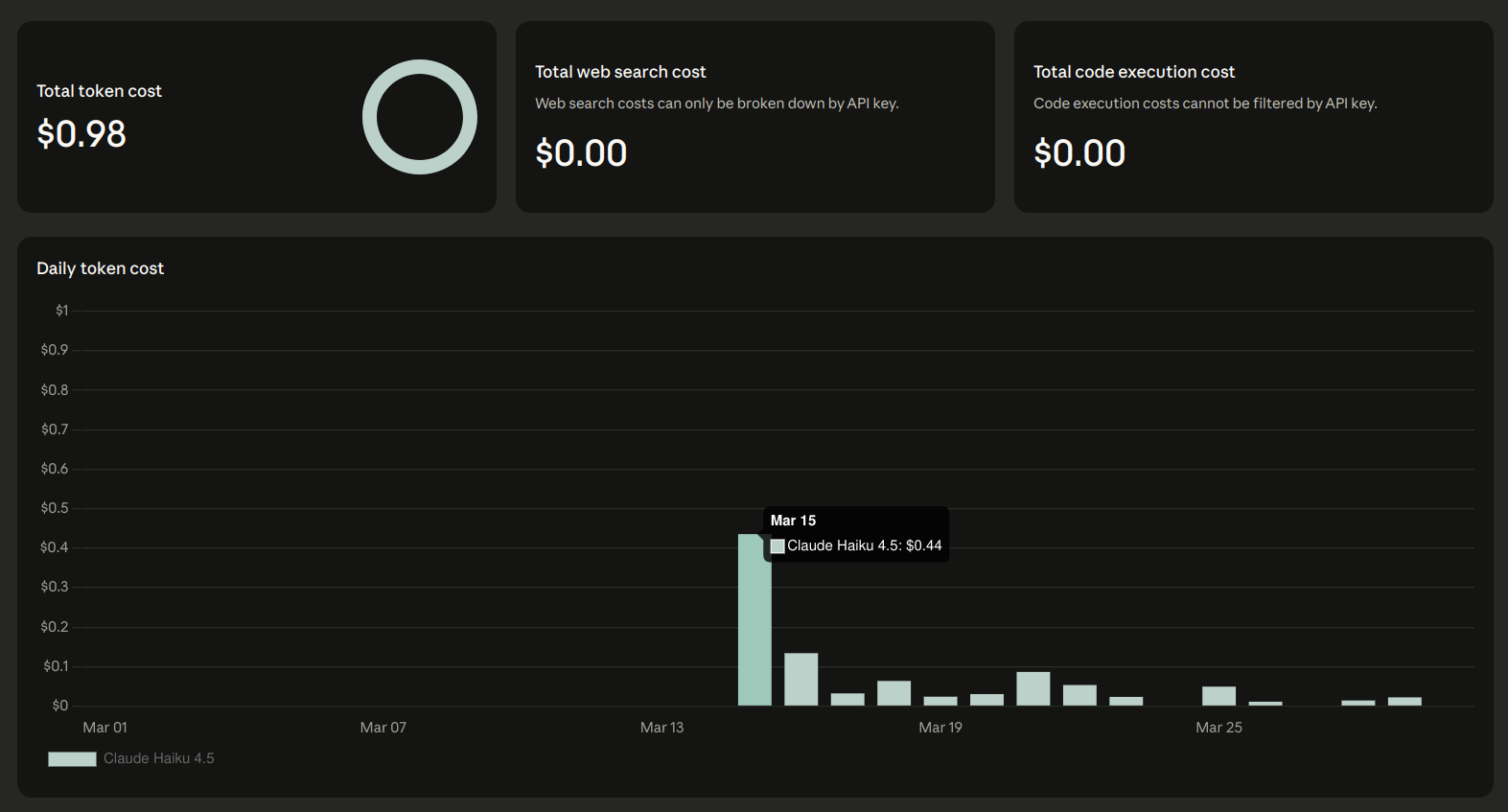
Money. Money is a problem here in addition to privacy. Every single request that escapes to AI sends a list of all the devices you've exposed to Assist and their state. On my first day of testing requests to AI, I spent about $0.45 in tokens. On other days I spend about 10 to 20 cents. I'd like this to be as close to zero as possible.
There are two solutions here:
- Trim down the list of exposed devices.
- Build a custom logging system that scrapes the Webhook debug API of Home Assistant to log all escaped voice sentences, find common patterns, and build manual sentence triggers to reduce these voice escapes.
I implemented BOTH of these.
The first one is easy config in Home Assistant. Just find all the devices exposed, and un-expose all the ones you're sure that you won't control by voice.
The second problem is a blog for another day!